
Design
Design
Field type:
Select
Available values:
• Clean
• Clean with line
• Surface
• Surface with line
• Surface with shadow
Example value:Surface
Path to the configuration:
Tab "Header" => Block "Minimal header (in the Checkout)" => Section "Design"
Technical name:twt-header-minimal-design
Select how the header stands out from the page content: Clean without a surface of its own, Surface with the background colour from the "Surface" section, each optionally with line or shadow.
Note: Adjust the colours to the selected design - the default colours are made for the default look.
Arrangement
Field type:
Select
Available values:
• Standard (logo, text, button)
• Standard (logo, text in coloured box, button)
• Grouped (text next to logo, with divider)
• Grouped (text in coloured box next to logo)
• Simple (logo and button only)
Example value:Standard (logo, text, button)
Path to the configuration:
Tab "Header" => Block "Minimal header (in the Checkout)" => Section "Design"
Technical name:twt-header-minimal-arrangement
Select how logo, text and back button are arranged.
Standard: Logo on the left, text in the centre, button on the right.
Grouped: The text sits right next to the logo (from 992px).
Simple: Only logo and button, without the text area.
On smartphones only the logo and the button are shown.
Basic configuration
Minimum height
Field type:
Text field
Example value:90
Path to the configuration:
Tab "Header" => Block "Minimal header (in the Checkout)" => Section "Basic configuration"
Technical name:twt-header-minimal-height
The header grows with its content if it needs more space.
Logo
Logo
Field type:
Media selection
Example value:
``
Path to the configuration:
Tab "Header" => Block "Minimal header (in the Checkout)" => Section "Logo"
Technical name:twt-header-minimal-logo-image
Optional: a separate logo for the minimal header. If the field stays empty, the shop logo is used.
Width
Field type:
Text field
Example value:140
Path to the configuration:
Tab "Header" => Block "Minimal header (in the Checkout)" => Section "Logo"
Technical name:twt-header-minimal-logo-width
Maximum width of the logo in pixels. It should not be larger than the actual image width.
Tip: Only set one of the two values, width or height, and leave the other one on "auto". Then the logo keeps its proportions and is not distorted. If you want to control the size via the height, enter "auto" here.
Height
Field type:
Text field
Example value:auto
Path to the configuration:
Tab "Header" => Block "Minimal header (in the Checkout)" => Section "Logo"
Technical name:twt-header-minimal-logo-height
Height of the logo in pixels. Leave it on "auto" as long as you set the size via the width.
Tip: If you enter a height here, set the width to "auto" - otherwise the logo can be distorted.
Text area
Text alignment
Field type:
Select
Available values:
• align center
• align left
Example value:align center
Path to the configuration:
Tab "Header" => Block "Minimal header (in the Checkout)" => Section "Text area"
Technical name:twt-header-minimal-content-alignment
Only applies to the "Standard" arrangements. With "Grouped" the text is always left-aligned next to the logo.
Text colour
Field type:
Color picker
Example value:#555555
Path to the configuration:
Tab "Header" => Block "Minimal header (in the Checkout)" => Section "Text area"
Technical name:twt-header-minimal-color
Link colour
Field type:
Color picker
Example value:#555555
Path to the configuration:
Tab "Header" => Block "Minimal header (in the Checkout)" => Section "Text area"
Technical name:twt-header-minimal-link-color
Link colour @hover
Field type:
Color picker
Example value:#222222
Path to the configuration:
Tab "Header" => Block "Minimal header (in the Checkout)" => Section "Text area"
Technical name:twt-header-minimal-link-color-hover
Background colour (box)
Field type:
Color picker
Example value:#e9ecef
Path to the configuration:
Tab "Header" => Block "Minimal header (in the Checkout)" => Section "Text area"
Technical name:twt-header-minimal-content-background-color
Only applies to the arrangements "text in coloured box".
Corner type (box)
Field type:
Select
Available values:
• not rounded
• rounded corners
Example value:rounded corners
Path to the configuration:
Tab "Header" => Block "Minimal header (in the Checkout)" => Section "Text area"
Technical name:twt-header-minimal-content-corner-type
Only applies to the arrangements "text in coloured box". The rounding follows the global border radius.
Divider colour
Field type:
Color picker
Example value:mix(black, $sw-border-color, 10%)
Path to the configuration:
Tab "Header" => Block "Minimal header (in the Checkout)" => Section "Text area"
Technical name:twt-header-minimal-content-divider-color
Only applies to the arrangement "Grouped (text next to logo, with divider)".
Back button
Layout type
Field type:
Select
Available values:
• Shopware (default)
• Button
• Button (outline)
Example value:Button
Path to the configuration:
Tab "Header" => Block "Minimal header (in the Checkout)" => Section "Back button"
Technical name:twt-header-minimal-back-btn-layout-type
Shopware (default): The button stays exactly as Shopware ships it - no ThemeWare® markup, no ThemeWare® styling, the button colour has no effect.
Button / Button (outline): Button with arrow icon, on smartphones only the icon.
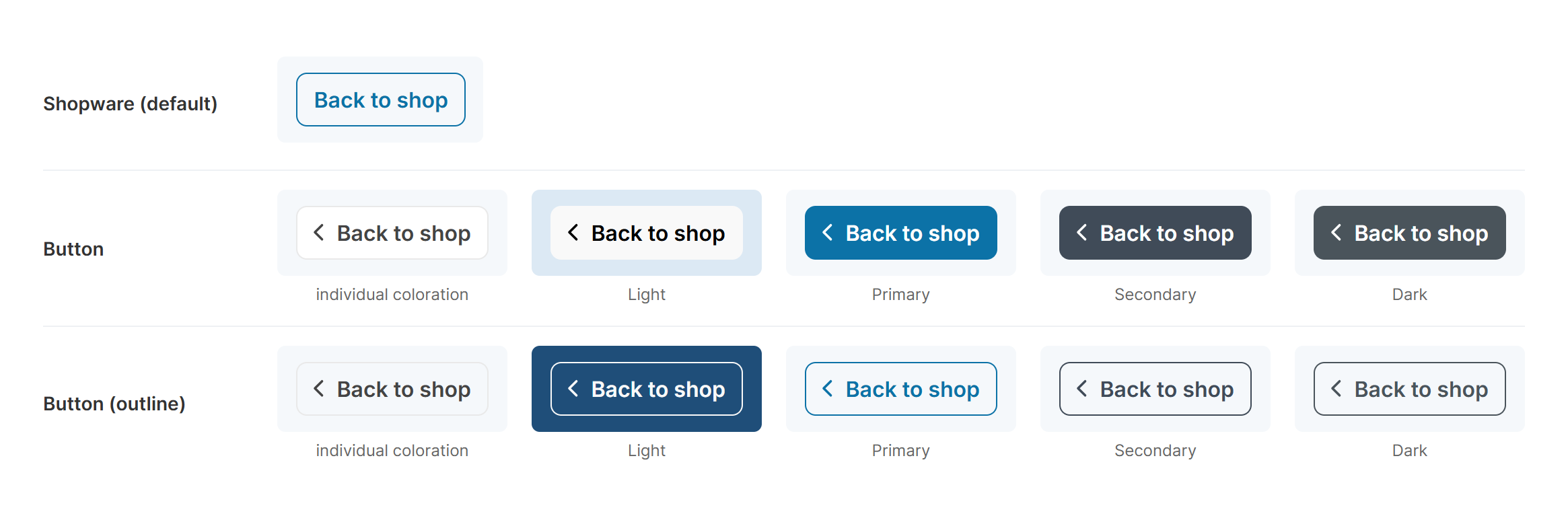
The back button in all layout types and button colours
Button colour
Field type:
Select
Available values:
• individual coloration
• Light
• Primary
• Secondary
• Dark
Example value:individual coloration
Path to the configuration:
Tab "Header" => Block "Minimal header (in the Checkout)" => Section "Back button"
Technical name:twt-header-minimal-back-btn-color-type
You configure the colours in the tab "Layout" => area "Buttons" => section "Colour configuration".
Individual coloration: The button uses the colours of this section.
Note: For "Button (outline)" choose a colour with sufficient contrast to the background, otherwise the button is barely visible.
Note: In the layout type "Shopware (default)" this configuration has no effect.
Text colour (Back button)
Field type:
Color picker
Example value:#444444
Path to the configuration:
Tab "Header" => Block "Minimal header (in the Checkout)" => Section "Back button"
Technical name:twt-header-minimal-home-btn-color
Only applies to the button colour "individual coloration".
Text colour (Back button) @hover
Field type:
Color picker
Example value:#666666
Path to the configuration:
Tab "Header" => Block "Minimal header (in the Checkout)" => Section "Back button"
Technical name:twt-header-minimal-home-btn-color-hover
Only applies to the button colour "individual coloration".
Border colour (Back button)
Field type:
Color picker
Example value:#e9e9e9
Path to the configuration:
Tab "Header" => Block "Minimal header (in the Checkout)" => Section "Back button"
Technical name:twt-header-minimal-home-btn-border-color
Only applies to the button colour "individual coloration".
Border colour (Back button) @hover
Field type:
Color picker
Example value:#d4d4d4
Path to the configuration:
Tab "Header" => Block "Minimal header (in the Checkout)" => Section "Back button"
Technical name:twt-header-minimal-home-btn-border-color-hover
Only applies to the button colour "individual coloration".
Background colour (Back button)
Field type:
Color picker
Example value:#ffffff
Path to the configuration:
Tab "Header" => Block "Minimal header (in the Checkout)" => Section "Back button"
Technical name:twt-header-minimal-home-btn-background-color
Only applies to the button colour "individual coloration".
Background colour (Back button) @hover
Field type:
Color picker
Example value:#f1f1f1
Path to the configuration:
Tab "Header" => Block "Minimal header (in the Checkout)" => Section "Back button"
Technical name:twt-header-minimal-home-btn-background-color-hover
Only applies to the button colour "individual coloration".
Surface
Background colour
Field type:
Color picker
Example value:#fafafa
Path to the configuration:
Tab "Header" => Block "Minimal header (in the Checkout)" => Section "Surface"
Technical name:twt-header-minimal-background-color
Only applies to the designs "Surface".
Border-bottom colour
Field type:
Color picker
Example value:#eeeeee
Path to the configuration:
Tab "Header" => Block "Minimal header (in the Checkout)" => Section "Surface"
Technical name:twt-header-minimal-border-bottom-color
Only applies to the designs "with line".