
> For the complete documentation index, see [llms.txt](https://docs.themeware.design/llms.txt). Markdown versions of documentation pages are available by appending `.md` to page URLs; this page is available as [Markdown](https://docs.themeware.design/additional-features/custom-fields/products/further-links.md).

# Further links

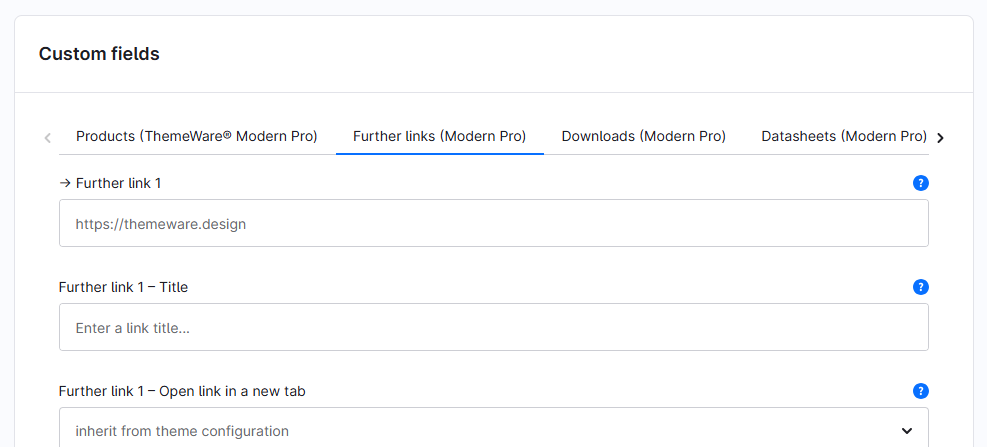
With the "Further links" custom fields you store up to three further links – each with a URL, title and the option whether the link opens in a new tab. They are displayed under the description on the product page via the ThemeWare® "Further links" extension.

## Custom fields

You can find the "Further links" custom fields in the respective product:

> Tab "Specifications" ⇒ Block "Custom fields" ⇒ Tab (Set) "Further links (... Pro)"
<figure><img src="https://3369454551-files.gitbook.io/~/files/v0/b/gitbook-x-prod.appspot.com/o/spaces%2FyzUEL0OiJhd4m6fQWdQe%2Fuploads%2FkL79jbQhwMmTs0v1NV6o%2Ftwt-custom-fields-product-tabs-further-links.png?alt=media&amp;token=b9964378-18f1-471f-8d9f-77aaa0bf7acc" alt=""><figcaption></figcaption></figure>

The individual custom fields:

* [Further link 1-3](/additional-features/custom-fields/products/further-links/further-link-1.md)
* [Further link 1-3 – Title](/additional-features/custom-fields/products/further-links/further-link-1-title.md)
* [Further link 1-3 – Open link in a new tab](/additional-features/custom-fields/products/further-links/further-link-1-open-link-in-a-new-tab.md)

***

## Further information

{% content-ref url="/pages/glKJmA1FSXFJVnXW9V6h" %}
[Further links](/additional-features/extensions/further-links.md)
{% endcontent-ref %}
