# Breadcrumb navigation

{% hint style="info" %}
**Note**: This article is work in progress.
{% endhint %}

Der ThemeWare® CMS-Block "**Breadcrumb-Navigation**" ist eine Variante vom Shopware CMS-Block "Breadcrumb-Navigation".

Der CMS-Block hat keine spezielle Funktion. Du musst diesen CMS-Block aber nutzen um das entsprechende CMS-Element in deiner Erlebniswelt zu platzieren.

{% hint style="info" %}
**Hinweis**: Dieser Block ist nur in der ThemeWare® Pro Edition verfügbar.
{% endhint %}

You can find more information about the CMS element here:

{% content-ref url="/pages/ezvhikFbHpfSsDHz9DXW" %}
[Breadcrumb navigation](/additional-features/cms-extensions/cms-elements/other/breadcrumb-navigation.md)
{% endcontent-ref %}

***

## Add block

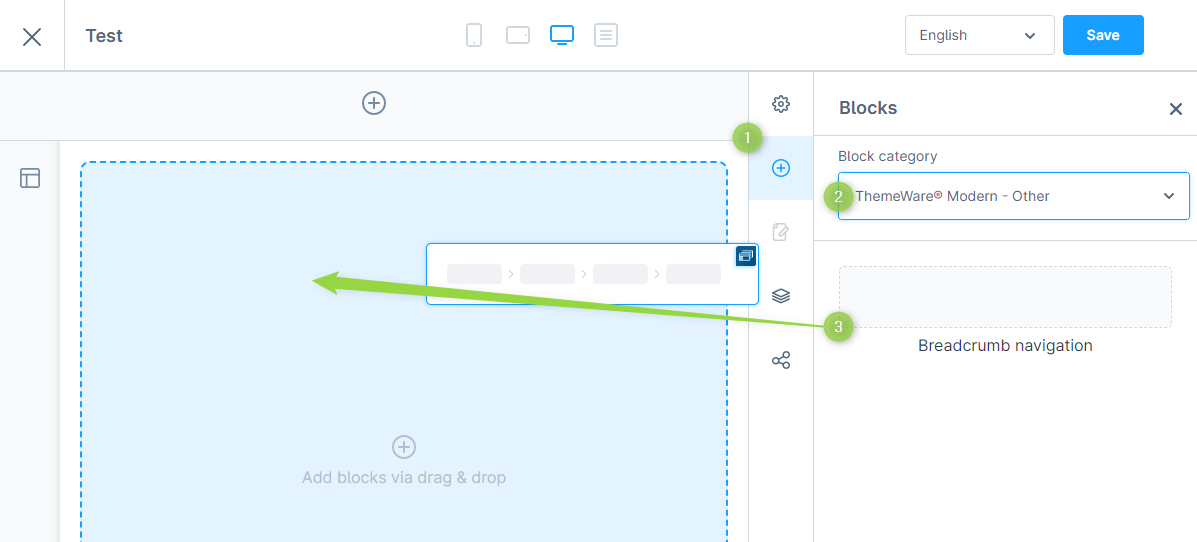
Wähle einen CMS-Block aus und ziehe diesen einfach per Drag’n’Drop in deine Erlebniswelt.

> **Hinweis**: Diese Blöcke findest du in der Rubrik "ThemeWare® Verschiedenes" \[Pro]

<figure><img src="/files/HiG8EWb0EPjvab8jC31g" alt=""><figcaption><p>Add CMS block "Breadcrumb navigation"</p></figcaption></figure>

***

## **Demo**

You can find some examples of use in our demo shops:

> Demo to follow\...


---

# Agent Instructions: Querying This Documentation

If you need additional information that is not directly available in this page, you can query the documentation dynamically by asking a question.

Perform an HTTP GET request on the current page URL with the `ask` query parameter:

```
GET https://docs.themeware.design/additional-features/cms-extensions/cms-blocks/other/breadcrumb-navigation.md?ask=<question>
```

The question should be specific, self-contained, and written in natural language.
The response will contain a direct answer to the question and relevant excerpts and sources from the documentation.

Use this mechanism when the answer is not explicitly present in the current page, you need clarification or additional context, or you want to retrieve related documentation sections.