
> For the complete documentation index, see [llms.txt](https://docs.themeware.design/llms.txt). Markdown versions of documentation pages are available by appending `.md` to page URLs; this page is available as [Markdown](https://docs.themeware.design/additional-features/custom-fields/products/videos.md).

# Videos

With the "Videos" custom fields you store product videos that are displayed on the product page via the ThemeWare® "Product videos" extension – under the description or in a separate tab. Available as uploaded HTML5 videos (Video 1–3) as well as embedded YouTube and Vimeo videos. Optionally you add a description text.

## Custom fields

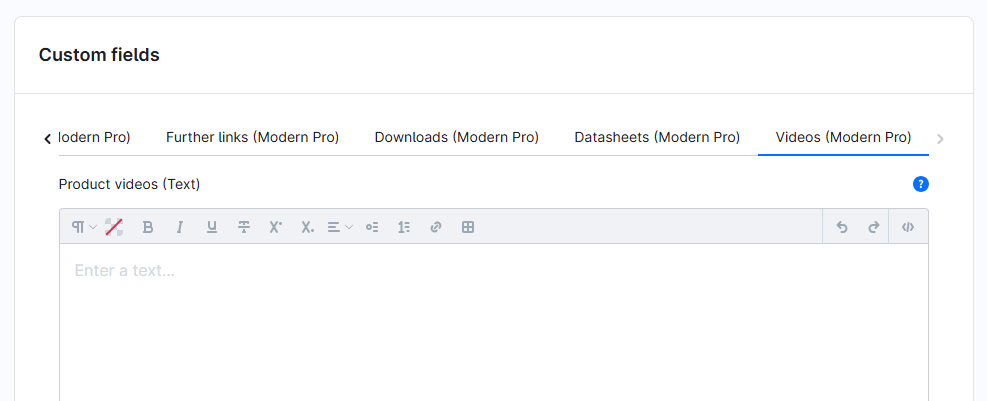
You can find the "Videos" custom fields in the respective product:

> Tab "Specifications" ⇒ Block "Custom fields" ⇒ Tab (Set) "Videos (... Pro)"
<figure><img src="/files/JxnHYHmJIkXLcHgkMR9C" alt=""><figcaption></figcaption></figure>

The individual custom fields:

* [Product videos (Text)](/additional-features/custom-fields/products/videos/product-videos-text.md)
* [Video 1-3](/additional-features/custom-fields/products/videos/video-1.md)
* [Video 1-3 – Title](/additional-features/custom-fields/products/videos/video-1-title.md)
* [YouTube video(s)](/additional-features/custom-fields/products/videos/youtube-video.md)
* [Vimeo video(s)](/additional-features/custom-fields/products/videos/vimeo-video.md)

***

## Further information

{% content-ref url="/pages/HfvkdzPWBS9BrvqI8f3H" %}
[Product videos](/additional-features/extensions/product-videos.md)
{% endcontent-ref %}
